




MessagePush:一套多通道消息推送服务
MessagePush 是一套统一的消息推送服务。业务系统只需对接一次,就能按需把消息发到微信、短信、邮件、Telegram、Bark,以及苹果、谷歌和国内主流安卓厂商推送通道。
下载地址:https://gitee.com/fightroad/message-push
支持哪些通道
- 微信模板消息
- MessagePusher
- 阿里云短信
- 腾讯云短信
- 邮件(SMTP)
- Apple 推送(APNs)
- Google 推送(FCM)
- Telegram Bot
- Bark(iOS)
- 华为推送
- 小米推送
- Vivo 推送
- OPPO 推送
核心能力一览
- 统一接入:各通道集中配置、统一调用
- 接口鉴权:通过 API ID / API Key 保护调用安全
- 两种发送模式
- 同步模式:等发送结果再返回,适合低并发、需要立刻确认
- 队列模式:先入队立刻返回,后台异步发送,适合高并发
- 多数据库:支持 SQLite、MySQL、SQL Server、PostgreSQL
- 可开关文档:可按需开启 Swagger 接口说明
开启 Swagger 后,可在浏览器中查看并调试发送接口,示例如下:
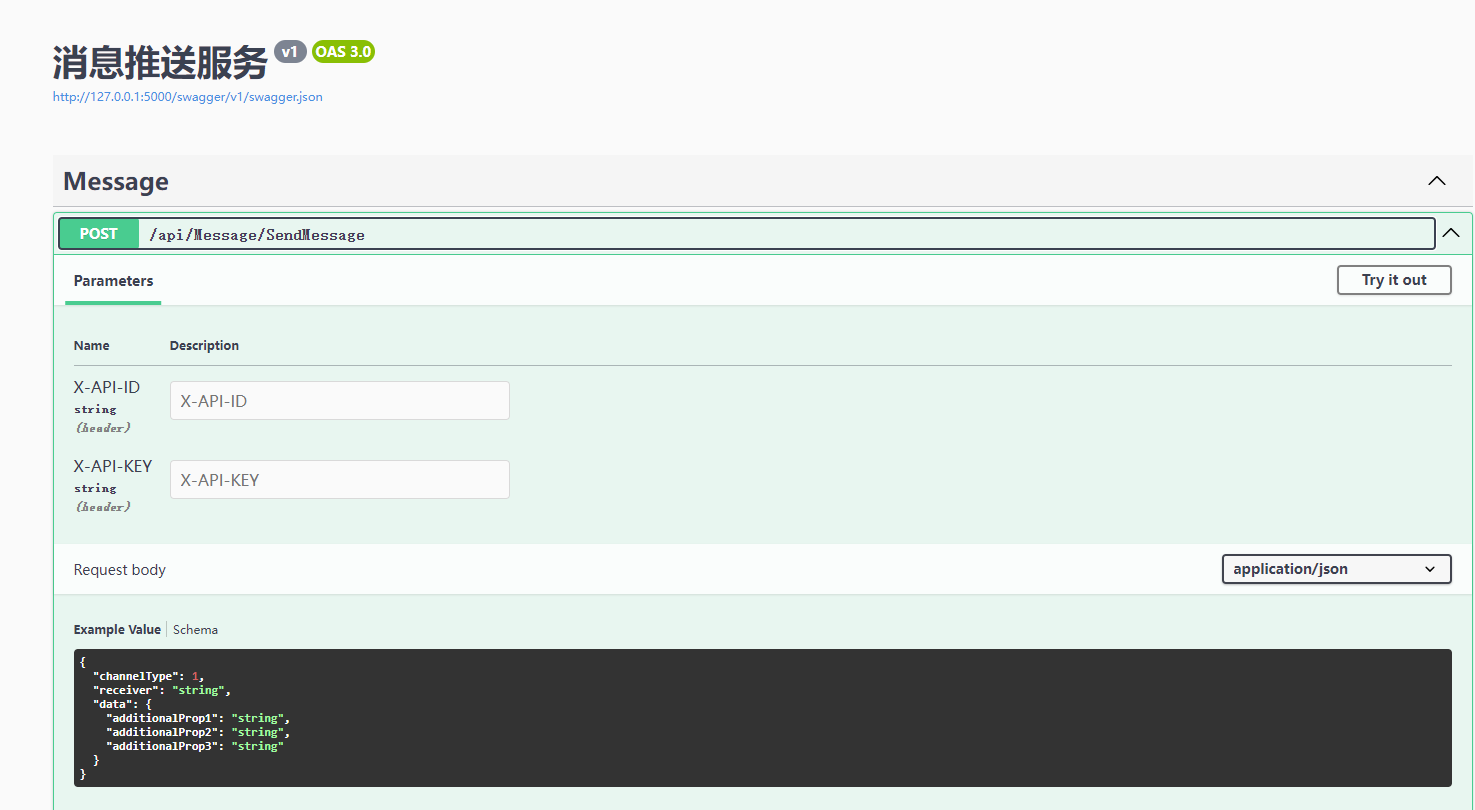
统一发送接口为 POST /api/Message/SendMessage,请求头需携带 X-API-ID、X-API-KEY。
配置总览
服务通过 appsettings.json 配置。下面是一份完整示例(请把 your_xxx 换成自己的真实参数):
{
  "Log": {
    "MinimumLevel": "Information",
    "EnableConsole": true,
    "RetainedDays": 30,
    "FileSizeLimitBytes": 10485760
  },
  "EnableSwagger": true,
  "EnableMessageQueue": false,
  "Kestrel": {
    "Endpoints": {
      "Http": {
        "Url": "http://*:5000"
      }
    }
  },
  "DbConfig": {
    "Type": "Sqlite",
    "ConnectionString": "Data Source=db/MessagePush.db"
  },
  "AuthTokens": {
    "test1": "1234567890",
    "test2": "0987654321"
  },
  "Weixin": {
    "AppId": "your_appid",
    "AppSecret": "your_secret"
  },
  "TelegramBot": {
    "BotToken": "your_bot_token"
  },
  "MessagePusher": {
    "ServerAddress": "https://msgpusher.com",
    "UserName": "your_username",
    "Token": "your_token"
  },
  "AliyunSms": {
    "AccessKeyId": "your_access_key_id",
    "AccessKeySecret": "your_access_key_secret",
    "SignName": "默认签名"
  },
  "TencentSms": {
    "SecretId": "your_secret_id",
    "SecretKey": "your_secret_key",
    "SdkAppId": "your_sdk_app_id",
    "Region": "ap-beijing",
    "SignName": "默认签名"
  },
  "Email": {
    "SmtpHost": "smtp.example.com",
    "SmtpPort": 587,
    "UserName": "your_email@example.com",
    "Password": "your_password",
    "EnableSsl": true,
    "FromAddress": "your_email@example.com",
    "FromDisplayName": "系统通知"
  },
  "ApplePush": {
    "P8PrivateKey": "-----BEGIN PRIVATE KEY-----\n...\n-----END PRIVATE KEY-----",
    "P8PrivateKeyId": "ABC123XYZ9",
    "TeamId": "ABCD123456",
    "AppBundleIdentifier": "com.example.app",
    "ServerType": "production"
  },
  "GooglePush": {
    "ServerKey": "your_fcm_server_key",
    "SenderId": "your_sender_id"
  },
  "Bark": {
    "ServerUrl": "https://api.day.app"
  },
  "HuaweiPush": {
    "AppId": "your_app_id",
    "AppSecret": "your_app_secret"
  },
  "XiaoMiPush": {
    "AppSecret": "your_app_secret"
  },
  "VivoPush": {
    "AppId": "your_app_id",
    "AppKey": "your_app_key",
    "AppSecret": "your_app_secret"
  },
  "OppoPush": {
    "AppKey": "your_app_key",
    "MasterSecret": "your_master_secret"
  }
}
基础项说明
- Log:日志级别、是否输出控制台、保留天数、单文件大小
- EnableSwagger:是否开启接口文档
- EnableMessageQueue:
false同步发送,true队列异步发送 - Kestrel:服务监听地址,默认
http://*:5000 - DbConfig:数据库类型与连接字符串
- AuthTokens:接口鉴权,键为 API ID,值为 API Key
发送模式怎么选
- 低并发、要立刻知道成败:同步模式(
EnableMessageQueue: false) - 高并发、可接受异步:队列模式(
EnableMessageQueue: true)
数据库怎么配
- SQLite(默认):
Type: Sqlite,Data Source=db/MessagePush.db - MySQL:
Type: MySql - SQL Server:
Type: Mssql - PostgreSQL:
Type: Pgsql
按实际环境填写对应连接字符串即可。
各通道配置说明
1. 微信模板消息
获取方式
- 登录微信公众平台
- 进入「开发 → 基本配置」
- 获取 AppID、AppSecret
- 在「功能 → 模板消息」申请模板,拿到模板 ID
配置项
AppId:公众号 AppIDAppSecret:公众号 AppSecret
2. MessagePusher
配置项
ServerAddress:服务地址UserName:用户名Token:访问令牌
3. 阿里云短信
配置项
AccessKeyIdAccessKeySecretSignName:默认短信签名
4. 腾讯云短信
配置项
SecretIdSecretKeySdkAppIdRegion:如ap-beijingSignName:默认短信签名
5. 邮件发送(SMTP)
配置项
SmtpHost:SMTP 服务器SmtpPort:建议587UserName:邮箱账号Password:密码或授权码EnableSsl:建议trueFromAddress:发件人地址FromDisplayName:发件人显示名
常见邮箱示例
QQ 邮箱:
- 主机:
smtp.qq.com - 端口:
587 - 密码处填「授权码」,不是登录密码
163 / 126:
- 主机:
smtp.163.com - 端口:
587 - 同样使用授权码
Gmail:
- 主机:
smtp.gmail.com - 端口:
587 - 使用应用专用密码(App Password)
注意:多数现代邮箱都要求开启 SSL/TLS;QQ、163 等请用授权码,不要用登录密码。
6. Apple 推送(APNs)
获取方式
- 登录 Apple Developer
- 进入 Certificates, Identifiers & Profiles
- 创建 Key,下载
.p8 - 记录 Key ID、Team ID
配置项
P8PrivateKey:私钥完整 PEM 内容(含 BEGIN/END)P8PrivateKeyId:Key IDTeamId:Team IDAppBundleIdentifier:应用 Bundle IDServerType:development或production
7. Google 推送(FCM)
获取方式
- 登录 Firebase Console
- 进入项目设置
- 获取 Server Key(或按平台要求配置服务账号)
配置项
ServerKey:FCM 服务器密钥SenderId:可选
请妥善保管 Server Key。
8. Telegram Bot
获取方式
- 在 Telegram 搜索
@BotFather - 发送
/newbot创建机器人 - 获取 Bot Token
配置项
BotToken:机器人 Token
Chat ID 说明
- 个人:正数,如
123456789 - 群组 / 频道:负数,如
-1001234567890 - 用户需先给 Bot 发过消息,Bot 才能主动发消息给对方
9. Bark(iOS)
Bark 是面向 iPhone 的自定义通知工具,底层走苹果 APNs。
使用步骤
- 安装 Bark App
- 在首页拿到 Device Key(推送时作为接收方标识)
- 按需配置服务器地址
配置项
ServerUrl:默认可填官方https://api.day.app;也可用自建地址
如需更高隐私性,可自建 Bark 服务端。
10. 华为推送
获取方式
- 登录华为开发者联盟
- 进入项目 → 推送服务
- 获取 AppId、AppSecret
配置项
AppIdAppSecret
应用需集成 HMS 推送 SDK,并取得设备 Token。
11. 小米推送
获取方式
- 登录小米开放平台
- 进入推送服务,创建应用
- 获取 AppSecret
配置项
AppSecret
支持 regid、alias 等方式推送。
12. Vivo 推送
获取方式
- 登录 Vivo 开放平台
- 进入推送服务
- 获取 AppId、AppKey、AppSecret
配置项
AppIdAppKeyAppSecret
13. OPPO 推送
获取方式
- 登录 OPPO 开放平台
- 进入推送服务
- 获取 AppKey、MasterSecret
配置项
AppKeyMasterSecret
怎么发送
接口: POST /api/Message/SendMessage
请求头:
- X-API-ID: your_api_id
- X-API-KEY: your_api_key
- Content-Type: application/json
X-API-ID / X-API-KEY 对应配置里 AuthTokens 的键和值;未通过鉴权会返回未授权。
通道类型对照
- channelType 1:微信模板消息
- channelType 2:MessagePusher
- channelType 3:阿里云短信
- channelType 4:腾讯云短信
- channelType 5:邮件(SMTP)
- channelType 6:Telegram Bot
- channelType 7:Bark
- channelType 8:Apple 推送(APNs)
- channelType 9:Google 推送(FCM)
- channelType 10:华为推送
- channelType 11:小米推送
- channelType 12:Vivo 推送
- channelType 13:OPPO 推送
响应示例
成功:
{
  "success": true,
  "messageId": "abc123..."
}
失败:
{
  "success": false,
  "message": "错误信息"
}
开启队列模式时,成功响应还会带上 queued: true。
发送示例
以下均为 POST /api/Message/SendMessage 的请求体,格式与配置段相同。
1. 微信模板消息
{
  "channelType": 1,
  "receiver": "your_openid",
  "data": {
    "templateId": "your_template_id",
    "url": "https://www.example.com",
    "templateData": {
      "title": {
        "value": "这是标题"
      },
      "description": {
        "value": "这是描述内容"
      }
    }
  }
}
说明:receiver 为 OpenID;也可改用 miniprogram 跳转小程序(与 url 二选一)。templateData 的 key 需与模板变量名对应,color 可选。
2. MessagePusher
{
  "channelType": 2,
  "receiver": "username",
  "data": {
    "title": "测试标题",
    "description": "这是一条测试描述",
    "content": "这是消息内容",
    "url": "https://example.com",
    "channel": "default"
  }
}
说明:receiver 可不填,不填则推送给自己。
3. 阿里云短信
{
  "channelType": 3,
  "receiver": "13800138000",
  "data": {
    "templateCode": "SMS_123456",
    "signName": "你的签名",
    "templateParams": {
      "code": "123456"
    }
  }
}
说明:signName 可选,不填则用配置中的默认签名。
4. 腾讯云短信
{
  "channelType": 4,
  "receiver": "13800138000",
  "data": {
    "templateId": "123456",
    "signName": "你的签名",
    "templateParams": ["123456"]
  }
}
5. 邮件
{
  "channelType": 5,
  "receiver": "user@example.com",
  "data": {
    "subject": "测试邮件",
    "body": "这是邮件内容",
    "isHtml": false
  }
}
说明:多个收件人可用逗号或分号分隔;还可选填 cc、bcc、priority、attachments。
6. Telegram Bot
{
  "channelType": 6,
  "receiver": "123456789",
  "data": {
    "text": "这是一条测试消息",
    "parseMode": "Markdown"
  }
}
说明:receiver 为 Chat ID;也可发 photo 图片或 document 文档,与 text 三选一。
7. Bark
{
  "channelType": 7,
  "receiver": "your_device_key",
  "data": {
    "title": "测试通知",
    "body": "这是一条测试消息",
    "url": "https://example.com"
  }
}
说明:body 必填;其余参数可按 Bark 官方文档透传。
8. Apple 推送(APNs)
{
  "channelType": 8,
  "receiver": "device_token_here",
  "data": {
    "title": "通知标题",
    "body": "通知内容",
    "sound": "default",
    "badge": 1
  }
}
说明:也支持传入完整 notification 对象;serverType 可选 development 或 production。
9. Google 推送(FCM)
{
  "channelType": 9,
  "receiver": "device_token_or_topic",
  "data": {
    "title": "通知标题",
    "body": "通知内容",
    "sound": "default"
  }
}
说明:也支持完整 payload 对象;receiver 可以是设备 Token 或主题。
10. 华为推送
{
  "channelType": 10,
  "receiver": "device_token_1,device_token_2",
  "data": {
    "title": "通知标题",
    "content": "通知内容",
    "clickActionType": "1"
  }
}
说明:多个 Token 用逗号或分号分隔。clickActionType:1 打开应用,2 打开链接,3 打开 Intent。
11. 小米推送
{
  "channelType": 11,
  "receiver": "regid1,regid2",
  "data": {
    "title": "通知标题",
    "description": "通知内容",
    "packageName": "com.example.app"
  }
}
说明:默认按 regid 推送;也可设 pushType 为 alias。description 必填。
12. Vivo 推送
{
  "channelType": 12,
  "receiver": "regid_here",
  "data": {
    "title": "通知标题",
    "content": "通知内容"
  }
}
说明:content 必填。
13. OPPO 推送
{
  "channelType": 13,
  "receiver": "regid_here",
  "data": {
    "title": "通知标题",
    "content": "通知内容",
    "targetType": 2
  }
}
说明:content 必填;targetType:1 全部,2 regId,3 别名,4 标签。
小结
MessagePush 适合需要「一套服务覆盖多通道」的场景:先把要用的通道凭证配进配置文件,再用统一接口按通道发送。同步或队列模式可按业务量切换,数据库也可按部署环境选择。
评论区